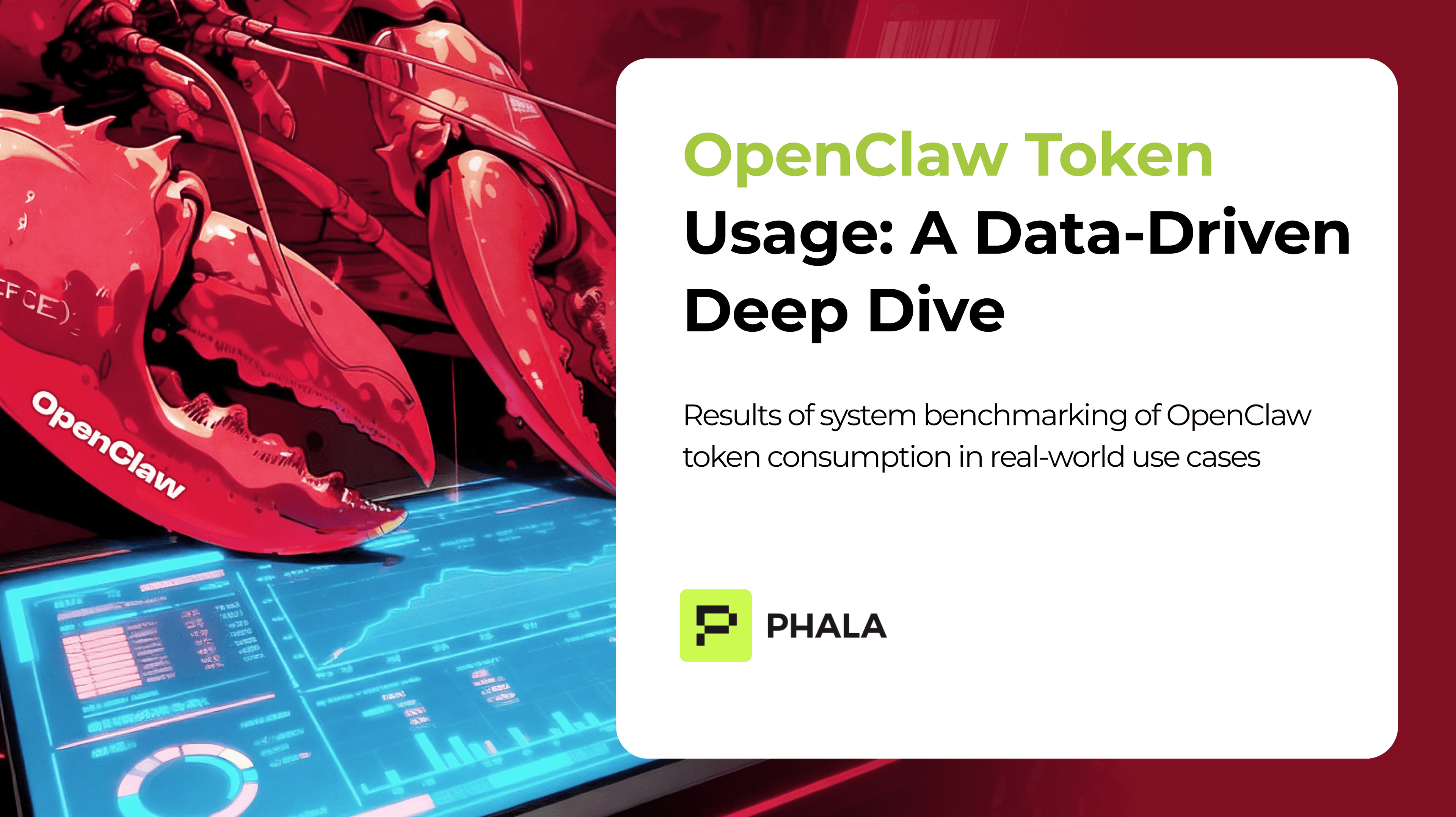
One of the most common questions we hear from OpenClaw users is: "How many tokens does this actually use?" There's plenty of advice out there about saving tokens, but surprisingly little hard data to back it up.
This post presents the results of a systematic benchmark measuring OpenClaw's token consumption across real-world use cases — email summarization, PDF/image/video analysis, programming tasks, web fetching, cron jobs, and multi-turn conversations.
TL;DR
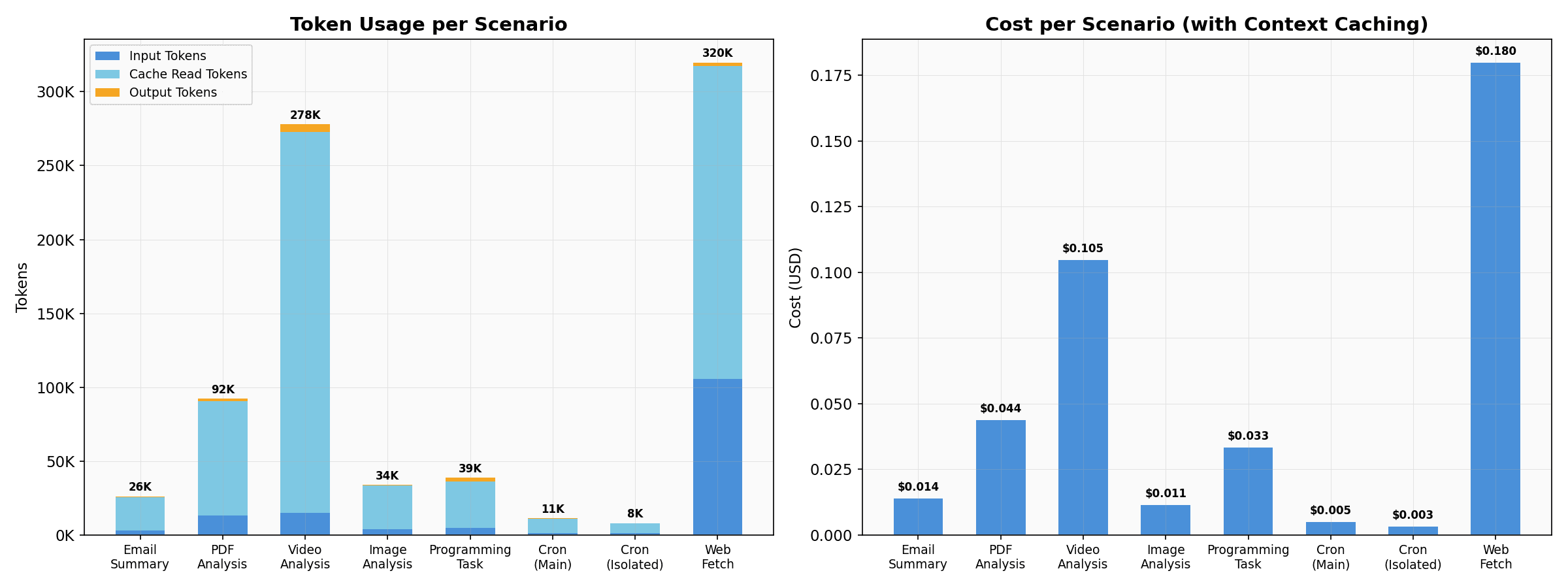
- Web Fetching is surprisingly expensive; Images are cheap. Fetching a web page can cost 10x more than writing code ($0.180), while processing a small image costs only pennies ($0.011). You pay a premium for the AI to write answers compared to reading context.
- The 8k Token Baseline. OpenClaw sends roughly 8,000 tokens of core instructions and skills with every single request. Adding more skills is cheap, but remember they add to this permanent baseline.
- The Danger of Multi-Turn. A 5-turn chat costs 13x more than a single-turn chat, because you re-pay to send the entire previous conversation history to the AI on every new message.
- Automate smartly. Running scheduled tasks in "Isolated Mode" saves ~37% per month because the AI starts fresh and doesn't have to carry your past conversation history.
All benchmarks were run on OpenClaw v2026.2.17 (official release, unmodified). You can find the code, raw JSON results, and instructions to run your own scenarios at the openclaw-token-benchmark repository on GitHub.
Model and Pricing
All scenarios use OpenAI gpt-5.1-codex as the sole model. The pricing at the time of benchmarking:
| Price per 1M tokens | |
| Input tokens | $1.25 |
| Output tokens | $10.00 |
| Cached input tokens | $0.125 (10% of input price) |
Note the 8:1 cost ratio between output and input tokens, and the 10x discount for cached input. These ratios heavily influence the cost dynamics you'll see below.
1. Token Usage Distribution: Reading vs Writing
When you ask OpenClaw to do something, you pay for two things:
- Reading (Input): The AI reading your files, the previous chat history, and its own instructions. (Cost: $1.25 per 1M tokens)
- Writing (Output): The AI typing out its actual response. (Cost: $10.00 per 1M tokens)
Because writing is 8x more expensive than reading, we see some highly counter-intuitive results:
Why is Web Fetching so Expensive?
You might expect a complex coding task to be the most expensive operation. In our benchmark, writing a complex cache system in TypeScript (with full tests) cost $0.033.
However, simply asking the agent to fetch and summarize a Wikipedia article cost $0.180—more than 5x the cost of coding!
Why? Because web pages are messy. To read the Wikipedia article, the agent had to make 6 separate tool calls (including browser fallbacks and raw HTML fetching). Each attempt pulled up to 12,000 characters of HTML code into the AI's "brain" (the input context). By the final turn, the AI was burdened with reading 320,000 tokens of raw website code.
Why are Images so Cheap?
Conversely, analyzing a 59KB image and identifying its contents cost only $0.011.
While this specific image wasn't huge, it highlights a key insight: pulling a single image into the AI's reading context is cheap, and the AI's answer (a short description) is short. Because you aren't paying the the 8x premium for long output generation (like you do when the AI writes 100 lines of code), multimedia analysis is often surprisingly affordable.
2. The 8k Token Baseline & Adding Skills
Before you even type your first message, OpenClaw has already spent about 8,000 tokens.
Where do these go? They belong to the Base Instructions: OpenClaw's core personality, rules, and the definitions for the 10 "skills" it comes with out-of-the-box. Every single time you send a message, this 8,000-token instruction manual is sent to the AI behind the scenes.
Is adding more skills expensive? Not exactly, but you should be mindful.
The 10 out-of-the-box skills take up about 1,200 tokens. If you were to install 10 more custom skills, you would add another ~1,200 tokens to that permanent baseline.
If you had to pay full price for this permanent baseline on every message, you'd go bankrupt. Fortunately, AI providers use Context Caching. If the AI sees the exact same block of text (like your permanent baseline instructions) repeatedly, it gives you a massive 90% discount on reading it.
Thanks to context caching, adding those 10 new skills only costs about $0.00015 per message instead of $0.0015. So, install the skills you need—just remember that they permanently sit in your background token usage.
3. The Danger of Multi-Turn Conversations
When you chat back-and-forth with OpenClaw, it doesn't just remember your old messages. It literally re-reads every past message (and all of its own previous answers) every single time you hit send.
We tested a realistic 5-turn programming conversation in a single session:
- "Write a debounce function"
- "Add a leading option and TypeScript generics"
- "Fix the bug where leading fires on every call"
- "Write unit tests with Vitest"
- "Add JSDoc comments and explain complexity"
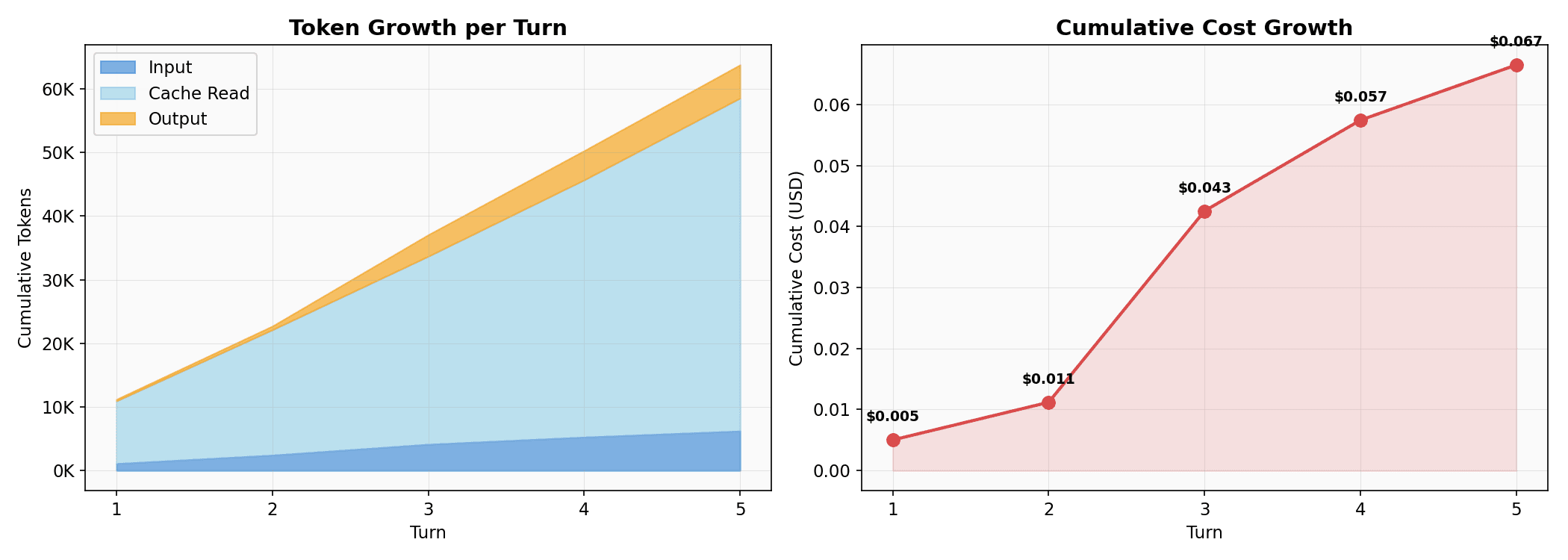
After 5 turns, the total cost for the conversation was 13.3x higher than the cost of the first turn.
Even with the 90% context caching discount applied to the older messages, the sheer volume of text piling up means the cost compounds rapidly. The AI's long code output from Turn 3 becomes extremely expensive "reading material" for Turns 4 and 5.
Practical tip: If you have a 10-turn conversation, it will cost roughly $0.13—which is 26x higher than a single-turn equivalent. Start a new session when you shift to a completely new subtask so you don't keep paying the AI to re-read history you no longer need.
4. Scheduled Tasks: Main vs Isolated Sessions
Automated scheduled tasks (cron jobs) like system health checks are small individually ($0.003–$0.005 per execution), but they run repeatedly. OpenClaw supports two ways to run these tasks, with very different cost profiles:
- Main session: The task runs inside your active conversation. This forces the AI to carry your entire current chat history along with it just to run a background check.
- Isolated session: The task gets its own fresh start behind the scenes with zero history.
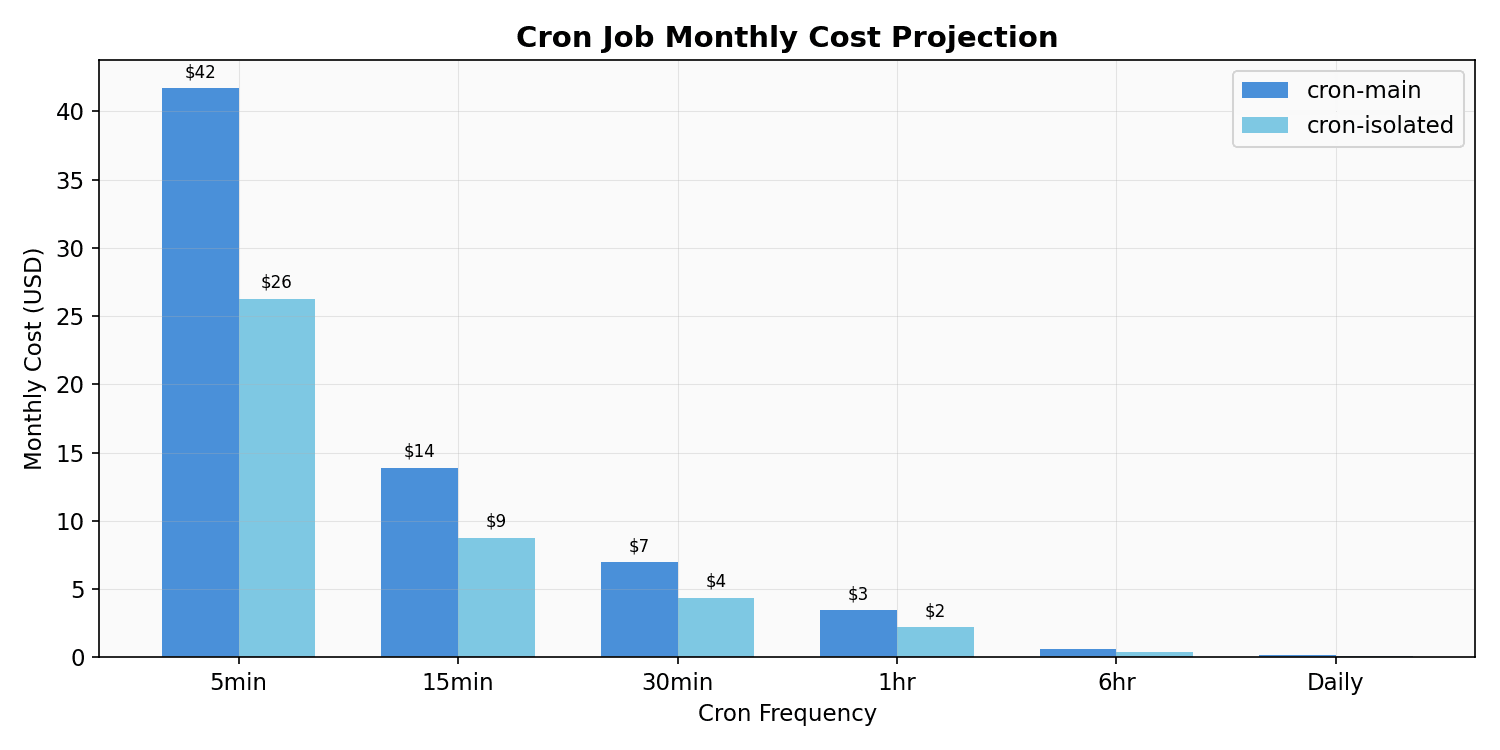
| Frequency | Monthly (Main) | Monthly (Isolated) | Savings |
| Every 5 min | $41.69 | $26.27 | 37% |
| Every 15 min | $13.90 | $8.76 | 37% |
| Every 30 min | $6.95 | $4.38 | 37% |
| Hourly | $3.47 | $2.19 | 37% |
| Daily | $0.14 | $0.09 | 37% |
The isolated mode consistently saves 37% because it never loads unnecessary conversation history. For a cron job running every 5 minutes, that's the difference between spending $42/month and $26/month.
For most tasks, hourly checks ($2/month) are perfectly sufficient. Keep your background tasks Isolated to protect your wallet.
Summary
| Finding | Detail |
| Cost spread | Ranges from $0.003 (cron) to $0.180 (web fetch) |
| Output is tiny | Only 1–6% of total tokens are output. You pay for reading context, not writing answers. |
| Multi-turn compounds | 5 turns = 13.3x the cost of 1 turn. Start fresh sessions for new subtasks |
| Automation frequency matters | 5-min vs hourly scheduling = 12x monthly cost. Use isolated mode for 37% savings |
| Total benchmark cost | All 8 single-task scenarios + 5-turn conversation: $0.46 |
The single most impactful factor is input content size. Be mindful of what you ask OpenClaw to process!
About Us & What's Next
We are Clawdi. We provide OpenClaw fully deployed to the TEE (Trusted Execution Environment) cloud, complete with well-configured channels and skills that easily connect with just a few clicks.
Looking ahead, we're actively working on context management improvements — like dynamic tool loading and smarter memory pruning — that will further reduce costs, particularly for multi-turn conversations and content-heavy scenarios. These will be released shortly. Stay tuned for updates.
Benchmark methodology: All scenarios run on OpenClaw v2026.2.17 with gpt-5.1-codex (OpenAI). Each scenario uses a fresh session via the OpenClaw gateway WebSocket JSON-RPC protocol. Token counts and costs are as reported by the gateway's sessions.usage API. Cache behavior depends on the LLM provider's prefix caching implementation — results will vary based on concurrent usage patterns and cache TTL. The benchmark harness is unmodified OpenClaw with the exception of a mocked email-summary skill.